

In the rapidly evolving digital landscape of today, Google Tag Manager Best Practices in 2026 have become indispensable rather than optional. Companies depend significantly on precise data to make informed marketing choices, and Google Tag Manager (GTM) is pivotal to this framework. More than 46% of websites worldwide utilize GTM (TagManifest), and the key factor is not its adoption but rather the effectiveness of its implementation. Inadequate configurations result in disorganized data, sluggish websites, and compliance issues.
Conversely, a properly organized GTM configuration can reveal valuable insights, enhance performance, and safeguard your analytics for the future. This guide will take you through the key GTM best practices for 2026 in a straightforward, practical manner.
Google Tag Manager Best Practices and Powerful Strategies
-
Build a Strong Foundation with Proper GTM Setup
Establishing a robust Go-To-Market (GTM) setup is the difference between scaling a business with precision and guessing your way through growth. A strong foundation begins with data integrity, ensuring that every touchpoint from the first ad click to the final sale, is tracked accurately within a unified “source of truth.”
Key Pillars of a Strong Setup:
- Strategic Alignment: Syncing your product-market fit with a clear ICP (Ideal Customer Profile) so your sales and marketing teams aren’t chasing the wrong leads.
- Integrated Tech Stack: Connecting your CRM, marketing automation, and analytics tools to eliminate data silos.
- Operational Agility: Designing a repeatable process that allows you to test hypotheses, gather feedback, and pivot without rebuilding your entire infrastructure.
By prioritizing this structural setup early, you create a feedback loop that transforms raw market data into actionable insights, allowing for sustainable and predictable revenue growth.
Use a Clean Container Structure
Start with a well-organized container. Avoid dumping all tags into one space. Instead:
- Create folders for different purposes (Analytics, Ads, UX tracking)
- Separate environments (Dev, Staging, Production)
- Maintain a consistent hierarchy
A messy container leads to confusion and errors over time.
Follow Consistent Naming Conventions
One of the biggest issues teams face is inconsistent naming.
Best practices:
- Use clear formats like:
Event – Category – Action – Label - Stick to one style (snake_case or camelCase)
- Avoid abbreviations
Clear naming improves collaboration and debugging significantly.
-
Prioritize DataLayer Over DOM Scraping
Choosing a DataLayer over DOM scraping is the hallmark of a professional tracking implementation. While DOM scraping, pulling data directly from HTML elements, might seem like a quick fix, it is inherently fragile; a simple CSS class change or a website redesign can instantly break your analytics.
By contrast, a DataLayer acts as a stable, virtual repository that sits between your website’s backend and your GTM container, ensuring that data is passed in a structured,
predictable format.
Why DataLayer is Superior?
- Reliability: Since the DataLayer is independent of the UI, your tracking remains intact even if you change your site’s design or layout.
- Data Integrity: It allows you to pass “clean” variables, like exact transaction IDs or SKU numbers, directly from the server, eliminating the risk of capturing messy or incomplete text from the browser.
- Security & Privacy: It gives you granular control over what data is exposed to third-party tags, making it easier to comply with privacy regulations like GDPR.
The Bottom Line : In a professional GTM setup, the DOM should be for display, and the DataLayer should be for data. Investing in a proper DataLayer implementation transforms your analytics from a “best guess” into a reliable engine for business intelligence.
Why DataLayer Matters in 2026?
In 2026, the DataLayer has become the backbone of reliable tracking and analytics. As privacy regulations tighten and third-party cookies continue to fade, businesses rely on a well-structured DataLayer to collect clean, consent-based data directly from their websites.
It ensures that tools like tag managers and analytics platforms receive consistent, accurate information without depending heavily on fragile front-end scripts. A strong DataLayer also improves flexibility and scalability.
Instead of hardcoding tracking for every new event or campaign, marketers and developers can simply push structured data into the DataLayer, making updates faster and less error-prone.
This not only reduces technical debt but also empowers marketing teams to adapt quickly in a fast-changing digital landscape. Ultimately, in 2026, the DataLayer is not just a technical component, it’s a strategic asset that enables better decision-making, more accurate attribution, and a future-proof measurement framework.
The DataLayer is the backbone of modern GTM setups. Instead of relying on fragile HTML elements:
- Push structured data directly from the website
- Track meaningful events reliably
- Avoid breakage during design changes
DOM scraping is outdated and unreliable. DataLayer ensures stability and scalability.
Adopt Event-Driven Tracking
Tracking pageviews alone is not enough anymore.
You should track:
- Button clicks
- Scroll depth
- Video engagement
- Form submissions
- User interactions
Event-driven tracking provides deeper insights into user behaviour and conversions.
-
Embrace Server-Side Tagging
Transitioning to Server-Side Tagging (SST) is the final step in moving from a basic tracking setup to a high-performance, privacy-centric data infrastructure. Unlike traditional client-side tagging, where the user’s browser sends data directly to third-party vendors, SST introduces a dedicated server to intercept, process, and route that data.
The Core Advantages
- Improved Website Performance: By shifting the heavy lifting of executing multiple scripts from the user’s browser to your server, you significantly reduce page load times and improve Core Web Vitals.
- Enhanced Data Privacy & Security: You act as a “gatekeeper.” Sensitive data can be stripped or hashed on your server before it ever reaches a third-party platform, ensuring better compliance with global privacy standards.
- Mitigation of Ad Blockers and ITP: Since the data is sent from your own sub-domain (first-party context), it is less likely to be blocked by browser privacy features like Intelligent Tracking Prevention (ITP) or common ad-blocking extensions.
- Enriched Data Streams: Server-side environments allow you to enrich data in real-time, such as adding profit margins or CRM data to a conversion event, without exposing that information in the client’s browser console.
Future-Proofing Your Growth
As the industry moves away from third-party cookies, Server-Side Tagging provides the control needed to maintain conversion attribution and marketing efficiency. It transforms your tracking from a passive observer into a controlled, first-party data asset.
Why Server-Side GTM is a Game Changer?
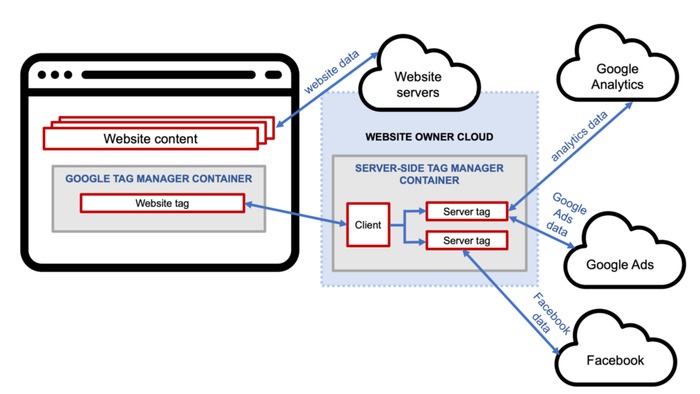
Server-side Google Tag Manager (GTM) is a game changer because it fundamentally shifts how data is collected, processed, and controlled. Instead of relying solely on browser-based tracking, which is increasingly limited by ad blockers, browser restrictions, and privacy policies, server-side GTM moves data handling to a secure server environment. This results in more reliable and consistent tracking, even as client-side methods become less dependable.
It also gives businesses greater control over data privacy and compliance. With server-side GTM, you can filter, anonymize, or enrich data before sending it to third-party platforms, helping you align with evolving regulations like GDPR and other global privacy standards. This level of control builds trust with users while still preserving valuable insights.
Another major advantage is improved website performance. By reducing the number of scripts running in the user’s browser, server-side GTM helps pages load faster, creating a smoother user experience. At the same time, it enables more accurate attribution and better data quality, which leads to smarter marketing decisions.
In 2026, server-side GTM isn’t just an upgrade, it’s becoming essential for businesses that want to stay competitive, privacy-compliant, and data-driven in a rapidly changing digital ecosystem. Server-side tagging is one of the biggest trends in 2026.
Benefits:
- Faster website performance
- Better data accuracy
- Reduced ad-blocker impact
- Improved privacy compliance
Modern setups are shifting critical tags (like analytics and ads) to server containers.
When to Use Server-Side Tagging
Use it when:
- You handle sensitive user data
- You want better control over tracking
- You run high-traffic websites
-
Optimize Performance and Page Speed
Optimizing performance and page speed is no longer just a technical luxury; it is a core requirement for both user experience and SEO rankings. In an era of diminishing attention spans, every millisecond shaved off your load time directly correlates to lower bounce rates and higher conversion peaks.
Core Strategies for Speed
- Prioritize Critical Rendering Path: Ensure that “above-the-fold” content loads first. By inlining critical CSS and deferring non-essential JavaScript, you allow users to interact with the page while the rest of the assets load in the background.
- Image and Asset Optimization: Utilize modern formats like WebP or AVIF and implement lazy loading. These practices ensure that high-resolution visuals don’t bottleneck the initial page render.
- Leverage Edge Computing: Use Content Delivery Networks (CDNs) to cache your content closer to the user’s physical location, drastically reducing latency.
- Minification and Compression: Strip unnecessary characters from your HTML, CSS, and JS files, and enable Brotli or Gzip compression to minimize the data payload sent over the network.
The GTM Impact
A cluttered Google Tag Manager container is often a silent killer of page speed. By auditing your tags, removing legacy scripts, and utilizing Server-Side Tagging, you can offload the execution burden from the user’s browser. This results in a leaner, faster site that satisfies both Google’s Core Web Vitals and your customers’ expectations for a seamless experience.
Load GTM Asynchronously
Always load GTM asynchronously to avoid slowing down your website.
Slow websites hurt:
- SEO rankings
- User experience
- Conversion rates
Avoid Tag Bloat
Too many tags can slow your site and create conflicts. Tips:
- Remove unused tags regularly
- Consolidate duplicate tracking scripts
- Audit your container monthly
-
Master Triggers and Variables in GTM
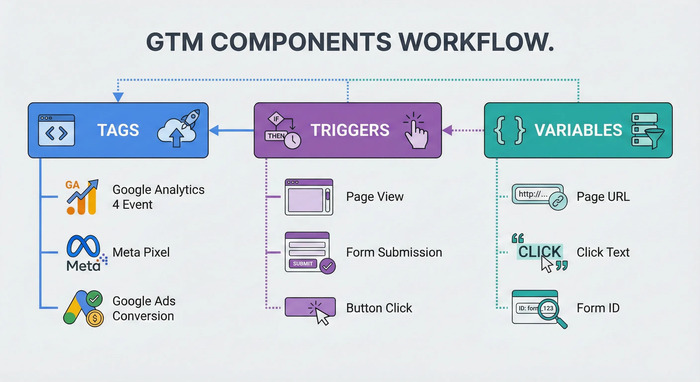
Mastering triggers and variables is essential to unlocking the full power of Google Tag Manager. Triggers define when a tag should fire, whether it’s a page view, button click, form submission, or a custom event, while variables provide the data that tags need to send, such as page URLs, user actions, or transaction values. Together, they form the logic that drives accurate and meaningful tracking.
When you understand how to configure triggers effectively, you can ensure your tags fire at the right moment without duplication or data loss. At the same time, well-structured variables allow you to capture dynamic information consistently across your website. This combination reduces errors, improves data accuracy, and gives you deeper insights into user behaviour.
In 2026, mastering triggers and variables is more important than ever. With increasing complexity in user journeys and stricter privacy requirements, businesses need precise, flexible tracking setups.
A strong foundation in triggers and variables not only simplifies your GTM implementation but also empowers you to adapt quickly, optimize campaigns, and make smarter, data-driven decisions.
Use Specific Triggers
Avoid generic triggers like:
- “All Pages”
- “All Clicks”
Instead:
- Use filters (URL, classes, IDs)
- Target specific actions
This prevents unnecessary tag firing and improves accuracy.
Leverage Built-in and Custom Variables
Variables help capture dynamic data like:
- Page URL
- Click text
- User behaviour
Use them wisely to create flexible and reusable tags.
-
Implement Strong Privacy & Consent Management
Implementing strong privacy and consent management is no longer optional, it’s a critical part of any modern digital strategy in 2026. With stricter global regulations and growing user awareness around data privacy, businesses must be transparent about how they collect, use, and store personal information.
A well-designed consent framework ensures that tracking only occurs after users have clearly agreed, helping you stay compliant and build long-term trust. Effective consent management also improves the quality of your data. By capturing user preferences accurately, you avoid collecting unreliable or non-compliant data that can distort your analytics.
Integrating consent signals with your tracking setup such as Google Tag Manager, allows you to control when tags fire based on user permissions, ensuring that marketing and analytics tools respect individual choices. Beyond compliance, strong privacy practices enhance your brand reputation.
Users are more likely to engage with businesses that prioritize their privacy and communicate it clearly. In a landscape where trust is a competitive advantage, implementing robust consent management helps you create a safer, more transparent, and future-ready digital experience.
Adopt Consent Mode v2
Privacy laws are stricter than ever in 2026. You must:
- Respect user consent
- Control when tags fire
- Adjust tracking based on region
Consent Mode ensures compliance with regulations like GDPR and others.
Avoid Unauthorized Data Collection
Studies have shown potential privacy risks when tags are misconfigured. Best practices:
- Audit third-party tags
- Limit data sharing
- Use allow/deny lists
-
Test Everything Before Publishing
Use Preview & Debug Mode
Never publish without testing. Use:
- GTM Preview mode
- Tag Assistant tools
Testing helps identify:
- Broken triggers
- Missing data
- Incorrect tag firing
Test Across Devices and Browsers
Even though modern browsers are consistent, testing ensures reliability across environments .
-
Maintain Documentation and Governance
Create a GTM Playbook
Document:
- Tag purpose
- Trigger logic
- Variables used
This ensures clarity for teams and future updates.
Assign Ownership
Every GTM setup should have:
- A responsible owner
- Defined processes
From community discussions: “Without clear ownership and naming conventions, containers quickly become chaotic.”
-
Regularly Audit and Clean Your Container
Why Audits Are Critical
Over time, GTM containers become cluttered.
Common issues:
- Duplicate tags
- Unused variables
- Conflicting triggers
Set a Cleanup Schedule
- Monthly: Quick review
- Quarterly: Deep audit
- Yearly: Full cleanup
This keeps your setup efficient and manageable.
-
Integrate GTM with Modern Analytics Tools
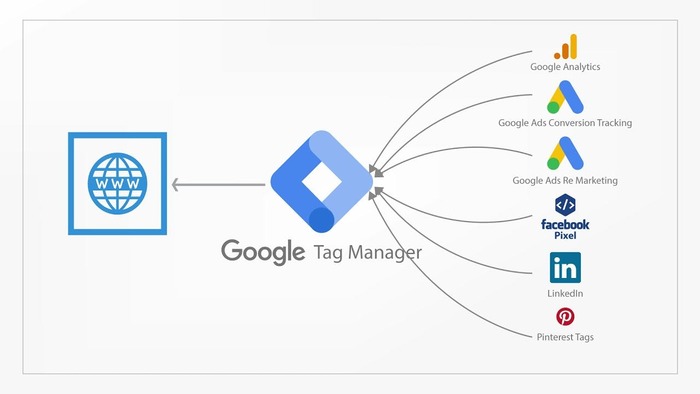
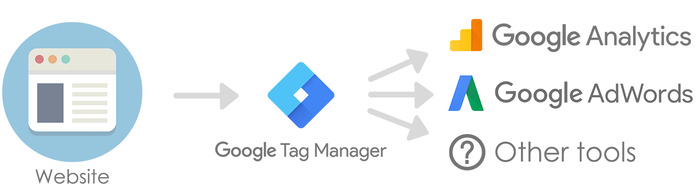
Integrating Google Tag Manager (GTM) with modern analytics tools is essential for building a smarter, more connected data ecosystem in 2026. Today’s marketing stack goes beyond just one platform, businesses rely on tools like Google Analytics 4, Mixpanel, and Amplitude to understand user behaviour across multiple touchpoints. GTM acts as the central hub that seamlessly connects these platforms without requiring constant code changes.
By integrating GTM with these tools, you can track user interactions more efficiently and send consistent, structured data across all platforms. This ensures that your marketing, product, and analytics teams are working with the same reliable data, reducing discrepancies and improving decision-making. It also allows you to quickly deploy new tracking events, test campaigns, and optimize performance without heavy developer involvement.
In 2026, this integration is especially powerful when combined with server-side tracking and a well-structured DataLayer. It enables better attribution, deeper insights, and more accurate reporting, even in a privacy-first world. Ultimately, integrating GTM with modern analytics tools helps businesses stay agile, data-driven, and competitive in an increasingly complex digital landscape.
Use GTM with GA4 and Ads
GTM should act as your central hub for:
- Google Analytics 4
- Google Ads
- Meta Pixel
- CRM tools
Centralized tracking improves flexibility and scalability.
Avoid Hardcoding Tags
Hardcoded scripts:
- Slow down development
- Reduce flexibility
Always deploy through GTM when possible.
-
Plan for Single Page Applications (SPAs)
Handle DataLayer Resets Properly
SPAs behave differently from traditional websites. Best practices:
- Reset DataLayer on route changes
- Track virtual pageviews
- Avoid stale data
-
Use Version Control and Environments
Leverage GTM Versioning
Every change in GTM creates a version.
Use it to:
- Roll back errors
- Track changes
- Maintain stability
Work with Environments
Separate:
- Development
- Testing
- Production
This reduces risks during deployment.
-
Use AI and Automation Carefully
AI-Powered Tagging in 2026
GTM now supports:
- Automated tag suggestions
- Error detection
- Predictive tracking
These tools improve efficiency but should always be reviewed manually.
-
Avoid Common GTM Mistakes
Even the most seasoned marketers can fall into traps that compromise data integrity. Avoiding these common Google Tag Manager (GTM) mistakes ensures your foundation remains solid and your insights stay actionable.
-
Hard-Coding Data in Tags
One of the most frequent errors is hard-coding values (like conversion IDs or specific URLs) directly into tags instead of using Variables.
- The Fix: Create Constant or Lookup Table variables. This allows you to update a value once and have it reflect across all associated tags, reducing the risk of manual errors during updates.
-
Over-Reliance on Generic Click Triggers
Using “All Elements” or “Just Links” click triggers without specific filters can lead to “Data Bloat.” If your triggers are too broad, GTM fires tags for every accidental click, skewing your conversion rates.
- The Fix: Use specific triggers based on Click ID, Click Class, or DataLayer events to ensure you only capture intentional user actions.
-
Neglecting “Preview and Debug” Mode
Publishing changes directly to a live environment without rigorous testing is a recipe for broken tracking or, worse, a broken website UI.
- The Fix: Always use the Tag Assistant (Preview Mode) to verify that tags fire on the correct triggers and that variables are capturing the expected data before hitting “Submit.”
-
Running Too Many Unused Tags
A cluttered container with “ghost tags” from old campaigns slows down your site and makes troubleshooting a nightmare.
- The Fix: Perform a quarterly GTM Audit. Pause or delete tags for expired promotions and consolidate similar tags using RegEx or Lookup Tables.
-
Ignoring Workspace Versions and Folders
Working in a single workspace without descriptive version names makes it impossible to “roll back” if something breaks.
- The Fix: Use Folders to organize tags by department or function (e.g., “Facebook Pixels,” “GA4 Events”) and always provide detailed notes in the Version Description before publishing.
Pro Tip: Treat your GTM container like a codebase. Document every custom HTML tag and JavaScript snippet to ensure that if someone else steps in, they understand the logic behind your setup.
Common mistakes include:
- Overloading tags
- Poor naming conventions
- Ignoring consent
- Not testing properly
Avoiding these ensures clean and reliable data.
-
Focus on Business Goals, Not Just Tracking
Focusing on business goals, not just tracking, is what separates meaningful analytics from noise. While tools like Google Tag Manager and Google Analytics 4 make it easy to collect large volumes of data, not all data drives value.
What truly matters is aligning your tracking setup with clear business objectives such as lead generation, sales growth, customer retention, or user engagement.
When your tracking strategy is built around goals, every tag, trigger, and variable has a purpose. Instead of tracking everything, you focus on key actions that reflect real business outcomes, like form submissions, purchases, or qualified leads. This approach not only simplifies your analytics setup but also makes your reports more actionable and easier to interpret.
In 2026, with increasing data complexity and privacy constraints, businesses that prioritize outcomes over raw data will have a clear advantage. By focusing on what truly impacts growth, you can make smarter decisions, optimize marketing efforts more effectively, and ensure your analytics setup supports real business success, not just numbers on a dashboard.
Track What Matters
Don’t track everything, track what matters:
- Conversions
- Engagement
- Revenue-driving actions
Good tracking aligns with business objectives.
FAQs on Google Tag Manager Best Practices in 2026
-
What is Google Tag Manager used for?
Google Tag Manager (GTM) is a powerful tool that helps you manage and deploy tracking codes, also known as tags, on your website without needing to manually edit the code each time. Instead of relying heavily on developers, marketers can add, update, or remove tags through a user-friendly interface. This makes it easier to track user behaviour, measure campaign performance, and integrate with various marketing and analytics platforms quickly and efficiently.
-
Is server-side tagging necessary in 2026?
Server-side tagging is not strictly mandatory, but it has become highly recommended in 2026. With increasing privacy restrictions, browser limitations, and ad blockers, traditional client-side tracking is becoming less reliable. Server-side tagging improves data accuracy, enhances website performance, and gives you more control over how user data is processed and shared. For businesses that rely on precise analytics and compliance, it’s quickly becoming a best practice rather than an option.
-
Why is DataLayer important?
The DataLayer plays a crucial role in ensuring your tracking setup is accurate and reliable. It acts as a structured data source that passes consistent information from your website to tools like Google Tag Manager. Instead of depending on fragile elements in the page (like buttons or CSS selectors that can change), the DataLayer provides clean, organized data. This reduces tracking errors, improves scalability, and makes your implementation more future-proof.
-
How often should I audit my GTM setup?
Regular audits are essential to keep your GTM setup clean and effective. Ideally, you should perform light reviews on a monthly basis to check if tags are firing correctly and remove any outdated or duplicate tracking. In addition, a more detailed audit should be done quarterly to evaluate your overall tracking strategy, ensure alignment with business goals, and identify opportunities for improvement. This proactive approach helps maintain data accuracy and prevents long-term issues.
-
What is Consent Mode in GTM?
Consent Mode is a feature that allows you to adjust how your tracking behaves based on user consent choices. When users accept or reject cookies, Consent Mode ensures that tags respond accordingly, either collecting full data, limited data, or no data at all. This helps businesses stay compliant with privacy regulations while still gaining useful insights. It’s a key component of modern, privacy-first tracking strategies.
-
Can GTM slow down my website?
Yes, GTM can impact website performance if it’s not implemented properly. Adding too many tags, poorly configured triggers, or unnecessary scripts can slow down page load times. However, when optimized correctly, GTM can actually improve performance by managing tags more efficiently. Using best practices like limiting unused tags, implementing server-side tagging, and controlling when tags fire can ensure your website remains fast and user-friendly.
Conclusion
In 2026, following Google Tag Manager best practices is no longer just about proper tag implementation, it’s about building a future-ready, privacy-first data strategy. As digital ecosystems become more complex and regulations continue to evolve, businesses must move beyond basic tracking and focus on structured data, server-side capabilities, and consent-driven measurement.
Using tools like Google Tag Manager alongside platforms such as Google Analytics 4, organizations can create a more reliable and scalable tracking framework. From maintaining a clean DataLayer to mastering triggers and variables, every element plays a role in ensuring accurate, actionable insights.
Ultimately, the key to success lies in aligning your GTM setup with real business goals, not just collecting data for the sake of it. When implemented thoughtfully, GTM becomes more than a technical tool, it transforms into a strategic asset that empowers smarter decisions, better user experiences, and sustainable growth in a privacy-conscious digital world.
Mastering Google Tag Manager Best Practices in 2026 is all about structure, clarity, and adaptability. GTM is no longer just a tagging tool, it is a critical part of your data infrastructure. By focusing on:
- Clean organization
- Reliable data tracking
- Privacy compliance
- Continuous optimization
, you can transform your GTM setup into a powerful engine for growth. For further reading, explore Google’s official documentation: https://support.google.com/tagmanager/
The difference between average and exceptional marketing today lies in data quality. And data quality depends heavily on how well your GTM is implemented. Invest the time to do it right, and your future insights will thank you.