

In the current digital landscape, data is the foundation of every effective marketing strategy. Businesses have moved beyond guesswork and now base their decisions on quantifiable insights. This highlights the significance of Data Tracking through Google Tag Manager.
Without precise tracking, businesses find it challenging to comprehend how users engage with their websites, which marketing efforts yield the best results, and where enhancements are necessary.
Google Tag Manager (GTM) serves as a robust tag management tool that enables marketers and developers to manage tracking codes effortlessly without the need for continual updates to the website code.
Importance of Data Tracking through Google Tag Manager
It provides a streamlined way to implement tags for analytics tracking, conversion tracking, remarketing pixels, and event tracking in a single accessible location. With GTM, businesses can gather crucial behavioural data, refine marketing initiatives, and enhance website functionality without hindering the development teams.
In this comprehensive guide, we will explore the Importance of Data Tracking through Google Tag Manager, how it works, its key benefits, and best practices for using it effectively.
What is Google Tag Manager?
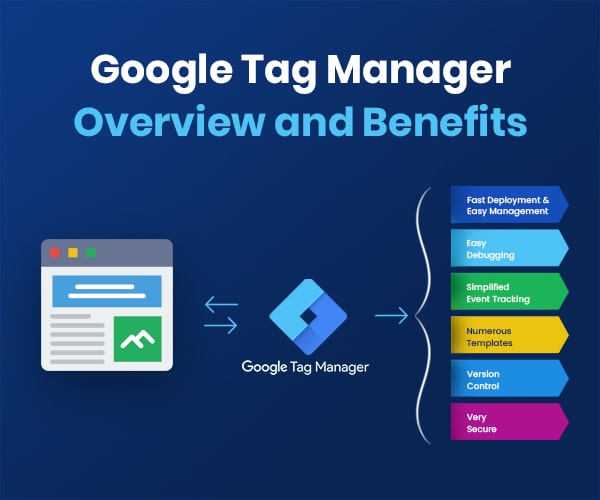
Think of Google Tag Manager (GTM) as a digital dashboard that acts as a middleman between your website and the various tracking tools you use. It allows you to manage and deploy marketing tags, small snippets of code like Google Analytics or Facebook Pixels, without having to manually edit your website’s source code every time you want to add something new.
Google Tag Manager is a free tool that allows users to manage and deploy marketing tags (snippets of code) on a website or mobile app without modifying the site’s code directly.
Tags are small pieces of code used to track user behaviour, such as:
- Page views
- Button clicks
- Form submissions
- Video engagement
- Ecommerce purchases
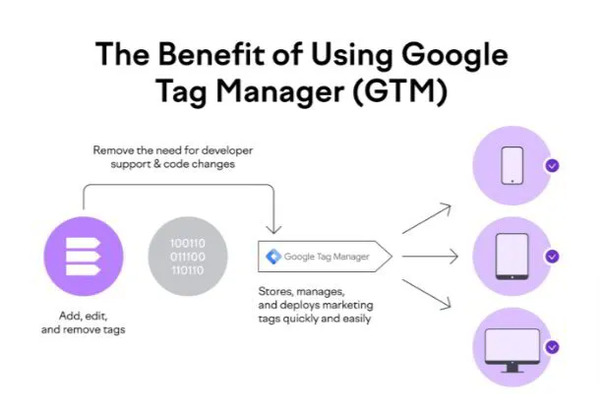
Instead of manually adding multiple scripts to your website, GTM stores them in a single container that can be managed through an intuitive interface.
Key Components of Google Tag Manager
Google Tag Manager (GTM) is a powerful tag management system that allows you to manage and deploy marketing tags (snippets of code or tracking pixels) on your website or mobile app without having to modify the code directly.
Core Components of GTM
- The Container: This is the top-level bucket for a specific website or app. When you install GTM, you place a single piece of code (the container snippet) on your site, which then “holds” all the other tags you want to run.
- Tags: These are the actual segments of code, such as Google Analytics tracking, Facebook Pixels, or AdWords conversion scripts that tell GTM what data to collect or what action to perform.
- Triggers: These are the conditions that determine when a tag should fire. For example, you might set a trigger to fire a tag only when a user clicks a “Submit” button or reaches a specific “Thank You” page.
- Variables: These are named placeholders for values that change, such as a product price, a URL, or a Form ID. They are used within both tags and triggers to make your configurations more dynamic and precise.
- Data Layer: This is an invisible layer of your website where GTM looks for information. It acts as a temporary storage bin that passes structured data from your website to the GTM container, ensuring that tags have the exact information they need to function correctly.
Understanding the structure of GTM helps clarify the Importance of Data Tracking through Google Tag Manager.
-
Tags
Tags are snippets of code used for tracking and analytics.
Examples include:
- Google Analytics tracking
- Conversion tracking
- Facebook Pixel
- Google Ads remarketing tags
-
Triggers
Triggers determine when a tag should fire.
Examples include:
- When a user visits a page
- When someone clicks a button
- When a form is submitted
-
Variables
Variables store information that tags and triggers use.
Examples include:
- Page URL
- Click text
- Scroll depth
- Referrer
Together, tags, triggers, and variables create a powerful data tracking system.
Importance of Data Tracking through Google Tag Manager
Data tracking through Google Tag Manager (GTM) is essential for any business that wants to move beyond “guessing” and start making decisions based on actual user behaviour. By centralizing your tracking, GTM ensures your data is accurate, consistent, and actionable.
Why GTM is Critical for Data Tracking?
- Granular User Insights: GTM allows you to track specific interactions that standard analytics might miss, such as scroll depth, video plays, form abandonment, and button clicks.
- Data Accuracy & Consistency: Because all tags are managed in one interface using the same Triggers and Variables, you reduce the risk of manual coding errors that lead to “dirty” or duplicated data.
- Agility and Speed: Marketing teams can deploy new tracking pixels (like LinkedIn or Pinterest tags) in minutes. This speed is vital for measuring the immediate ROI of a new ad campaign.
- Better Site Performance: GTM loads tags asynchronously, meaning they don’t block the rest of your page from loading. This keeps your site fast while still collecting robust data.
- The Data Layer Advantage: By using a Data Layer, GTM can pass complex information (like transaction totals or product SKUs) directly to your analytics tools in a structured format, ensuring high-fidelity reporting.
The Importance of Data Tracking through Google Tag Manager becomes evident when businesses want deeper insights into user behaviour and marketing performance.
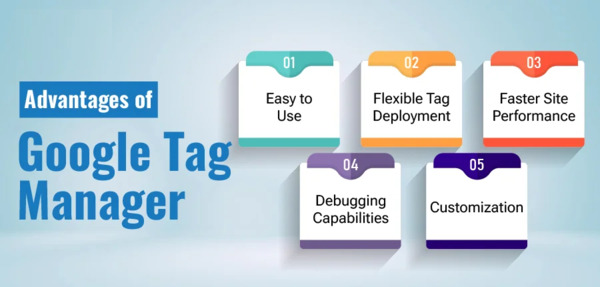
Let’s explore the most important benefits of Google Tag Manager.
-
Simplifies Website Tracking
Before GTM, marketers had to rely on developers to add or update tracking codes on websites.
This process was:
- Time-consuming
- Error-prone
- Inefficient
With Google Tag Manager, marketers can deploy tracking tags instantly without touching the site code.
This means:
- Faster campaign launches
- Reduced developer workload
- More accurate tracking implementation
-
Centralized Tag Management
Modern websites use many different tracking tools such as:
- Google Analytics
- Google Ads
- Facebook Pixel
- LinkedIn Insight Tag
- Conversion tracking tools
Without a centralized system, managing these scripts becomes complicated.
Google Tag Manager solves this by allowing all tags to be controlled in one interface.
Benefits include:
- Easier tag updates
- Reduced code clutter
- Better organization
-
Faster Website Performance
Every script added to a website can potentially slow it down.
GTM improves performance because:
- Tags load asynchronously
- Scripts are managed in one container
- Unnecessary tags can be removed easily
A faster website improves:
- User experience
- SEO rankings
- Conversion rates
This is another major reason why understanding the Importance of Data Tracking through Google Tag Manager is essential.
-
Advanced Event Tracking
One of the most powerful features of GTM is event tracking. Event tracking allows you to monitor specific user actions such as:
- Clicking download buttons
- Watching videos
- Scrolling through pages
- Clicking outbound links
- Submitting forms
These insights help businesses understand:
- What content users engage with
- Where visitors drop off
- Which actions lead to conversions
This data is critical for improving marketing strategies.
-
Better Conversion Tracking
Businesses invest heavily in digital marketing campaigns. Without proper tracking, it’s impossible to know which campaigns generate revenue. Using GTM, marketers can track:
- Leads
- Purchases
- Newsletter signups
- Downloads
- Contact form submissions
This allows businesses to measure:
- Return on investment (ROI)
- Campaign effectiveness
- Customer acquisition channels
Better conversion tracking leads to smarter marketing decisions.
-
Improved Marketing Optimization
When businesses collect detailed data, they can optimize their marketing strategies more effectively. Data from GTM helps answer questions such as:
- Which pages drive conversions?
- Which traffic sources perform best?
- What content attracts users?
- Where do users abandon the funnel?
These insights allow companies to refine their:
- Advertising campaigns
- Content strategies
- Website design
- User experience
-
Reduces Dependence on Developers
Traditionally, implementing tracking scripts required constant developer involvement.
With GTM, marketers can:
- Add tracking codes
- Test tags
- Publish updates
- Create event triggers
This reduces development workload and speeds up marketing execution. Developers only need to install the GTM container once. After that, most tracking changes can be handled independently.
Key Data You Can Track with Google Tag Manager
Understanding the Importance of Data Tracking through Google Tag Manager also involves knowing what data can be tracked. Here are common tracking examples.
-
Page Views
Track which pages visitors view and how often.
-
Click Tracking
Measure interactions with buttons, links, and menus.
-
Scroll Depth
Understand how far users scroll through your content.
-
Video Engagement
Track when users start, pause, or complete videos.
-
Form Submissions
Identify when users submit contact forms or lead forms.
-
Ecommerce Transactions
Track purchases, product views, and cart actions.
How Google Tag Manager Works?
Google Tag Manager (GTM) works as a bridge between your website (the source of data) and your marketing/analytics tools (the destination for data). Instead of editing your website’s code every time you want to track a new action, you use GTM’s interface to manage the “tags” that collect that information.
The Three-Step Process
The workflow of GTM generally follows a Request → Trigger → Fire logic:
- The Request (The Data Layer): When a user interacts with your site (e.g., clicks a link or loads a page), the website sends information to the Data Layer. This is a virtual map of all the information GTM can “see” at any given moment.
- The Condition (The Trigger): GTM constantly monitors the Data Layer. It looks for specific conditions you’ve defined, known as Triggers. For example, a trigger might be “The URL contains /checkout” or “The button ID is ‘buy-now’.”
- The Action (The Tag): If the conditions of a trigger are met, GTM “fires” the associated Tag. This tag then sends the relevant data to a third-party tool like Google Analytics 4, Meta Pixel, or Google Ads.
To fully understand the Importance of Data Tracking through Google Tag Manager, it helps to see how the process works.
Step 1: Create a GTM Account
You first create a container for your website.
Step 2: Install GTM Code
A small code snippet is added to the website once.
Step 3: Configure Tags
Add tracking tags such as analytics or conversion scripts.
Step 4: Set Triggers
Define when those tags should activate.
Step 5: Test with Preview Mode
Ensure tags fire correctly before publishing.
Step 6: Publish the Container
Once verified, publish the container to activate tracking.
Best Practices for Using Google Tag Manager
To maximize the Importance of Data Tracking through Google Tag Manager, follow these best practices.
-
Use Proper Naming Conventions
Clear naming makes tags easier to manage.
Example:
- GA4 – Page View
- GA4 – Button Click
- Ads – Conversion Tag
-
Test Before Publishing
Always use preview mode to test tags. This helps prevent incorrect data tracking.
-
Organize Tags with Folders
Large websites may have dozens of tags. Organizing them keeps your workspace manageable.
-
Limit Unnecessary Tags
Too many tags can slow websites and clutter analytics. Only implement tracking that provides value.
-
Maintain Documentation
Keep records of:
- What tags are installed
- Why they exist
- Who created them
This prevents confusion later.
Common Mistakes to Avoid While Using Google Tag Manager

While Google Tag Manager makes tracking much easier, small mistakes can lead to inaccurate data or tracking issues. Being aware of these common errors can help you maintain clean and reliable analytics.
One common mistake is adding duplicate tracking tags. This often happens when the same tracking code is installed directly on the website and again through Google Tag Manager. Duplicate tags can cause inflated data, such as double-counted page views or conversions.
Another issue is publishing changes without testing them first. Google Tag Manager provides a preview and debug mode that allows you to check whether tags are firing correctly. Skipping this step may result in broken tracking or incorrect data being sent to analytics tools.
Many users also make the mistake of using unclear naming conventions for tags, triggers, and variables. When the container grows with many tags, poor naming can make it difficult to understand what each element does. Clear and descriptive names make management much easier in the long run.
Another common error is setting incorrect triggers. If triggers are not configured properly, tags may fire on the wrong pages or not fire at all. This can lead to missing or misleading data.
Lastly, some users add too many unnecessary tags. Overloading the container with scripts that aren’t essential can complicate tracking and potentially affect website performance. It’s best to keep your container clean and only track what is truly useful for your business goals. Even though GTM simplifies tracking, mistakes still happen. Avoid these common issues.
-
Duplicate Tracking Codes
Adding the same tracking tag twice can inflate analytics data.
-
Incorrect Trigger Settings
Improper triggers can cause tags to fire at the wrong time.
-
Publishing Without Testing
Always verify tags before publishing changes.
-
Ignoring Data Layer Implementation
Advanced tracking often requires a data layer for accurate data.
Real-World Applications of Google Tag Manager
While Google Tag Manager (GTM) is often discussed in technical terms, its real-world value lies in how it solves specific business problems. In 2026, its applications range from basic marketing tracking to complex, AI-driven personalization.
-
E-Commerce & Revenue Optimization
- Enhanced E-commerce Tracking: High-growth brands use GTM to track the entire buyer journey from viewing a product and adding it to the cart to the final purchase. This data is then sent to GA4 and Google Ads to calculate Return on Ad Spend (ROAS).
- Cart Abandonment Insights: GTM can trigger a signal if a user adds an item to their cart but stays idle for more than three minutes, allowing for immediate “exit-intent” popups or personalized recovery emails.
- Dynamic Remarketing: E-commerce sites use GTM variables to “scrape” product IDs and prices from a page, sending that specific data to Meta or TikTok Pixels so you see ads for the exact shoes you just looked at.
-
Marketing Agility & Growth
- Bypassing Developer Backlogs: Marketing teams use GTM to deploy “emergency banners” (e.g., for a site-wide sale or a shipping delay) or hotfix broken UI elements without waiting for a developer to push a new code build.
- A/B Testing & Experimentation: Companies use GTM to inject scripts for tools like Optimizely or VWO to run split tests on landing pages, helping them determine which headlines or button colors convert better.
- Affiliate & Lead Tracking: Publishers use GTM to track clicks on affiliate links or monitor form abandonment (where a user starts a form but doesn’t finish) to identify which fields are causing friction.
-
Advanced & Future-Ready Tech (2026 Trends)
- Server-Side Tagging: Modern enterprises are moving tags to a Server Container to bypass ad blockers, improve site speed (by running fewer scripts in the browser), and comply with strict 2026 privacy laws like GDPR and CCPA.
- AI-Powered Personalization: Businesses now integrate GTM with AI models to trigger “Welcome Back” messages or custom content based on a user’s past behavior or the channel they arrived from.
- Consent Mode v2: With the “cookieless” web in full effect, GTM is used to manage Consent Mode, ensuring tracking tags only fire if a user has opted in, while still providing “modeled” data for those who opt out.
-
B2B & Lead Generation
- Lead Scoring: B2B companies track high-intent behaviors, like downloading a whitepaper, watching 75% of a demo video, or visiting the pricing page and send those “signals” to CRMs like Salesforce or HubSpot to score leads for the sales team.
- LinkedIn Insight Tag: B2B marketers use GTM to deploy the LinkedIn Pixel, allowing them to see the job titles and industries of the people visiting their site.
Comparison of Use Cases
| Industry | Common GTM Application | Business Impact |
| E-Commerce | Enhanced Purchase Tracking | Accurate ROAS and Attribution |
| SaaS/B2B | Lead Form & Video Tracking | Better Lead Quality & Sales Sync |
| Content/Blogs | Scroll Depth & Affiliate Clicks | Content Engagement Optimization |
| Enterprise | Server-Side Tagging | Site Speed & Privacy Compliance |
Businesses across industries use GTM for data tracking.
Examples include:
Ecommerce Stores
Track product views, cart actions, and purchases.
Lead Generation Websites
Measure form submissions and call clicks.
Content Websites
Analyze engagement, scroll depth, and user interactions.
SaaS Platforms
Track user onboarding and feature usage.
External Resource for Learning GTM
If you want official documentation and tutorials, you can explore: https://tagmanager.google.com/, This resource provides setup guides and advanced implementation techniques.
Frequently Asked Questions (FAQs)
-
What is Google Tag Manager used for?
Google Tag Manager is used to manage and deploy tracking tags on websites without directly editing the site’s code.
-
Is Google Tag Manager free to use?
Yes, Google Tag Manager is completely free for websites and mobile apps.
-
Do I need coding skills to use GTM?
Basic tracking can be done without coding, but advanced implementations may require some technical knowledge.
-
Does Google Tag Manager replace Google Analytics?
No, GTM does not replace analytics tools. Instead, it helps deploy and manage analytics tracking codes.
-
Can Google Tag Manager improve website performance?
Yes, GTM helps optimize script loading and manage tags more efficiently, which can improve site performance.
-
Is Google Tag Manager safe for websites?
Yes, when implemented properly, GTM is secure and widely used by businesses worldwide.
Conclusion
The significance of data tracking via Google Tag Manager is crucial in today’s digital marketing landscape. Precise data tracking allows companies to comprehend user behaviour, assess the effectiveness of their campaigns, and base their decisions on data.
Google Tag Manager streamlines tag management by consolidating it in one place, facilitating advanced event tracking, and minimizing dependence on developers. Whether it’s monitoring button clicks or analyzing ecommerce transactions, GTM offers profound insights into user interactions with websites.
Organizations that implement proper data tracking strategies gain a competitive advantage by optimizing marketing campaigns, improving user experiences, and increasing conversions. In a world where data drives growth, mastering Google Tag Manager is no longer optional, it is essential.