

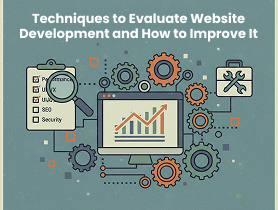
Creating a website is easy. But building a high-performing website that entices visitors, loads quickly, and drives conversions? That requires constant evaluation. A website isn’t something you develop once and forget, it progresses as technology, user expectations, and search engine algorithms change.
your website isn’t performing the way it should, it’s time to evaluate and optimize it. Let’s explore the most effective techniques to check your website’s health and the proven ways to progress it.
Key Techniques to Evaluate Website Development
There are numerous key techniques used to evaluate website development, ensuring the final product is effective, functional, and user-friendly. A critical technique is Usability Testing, where real users interact with the site to recognize issues with navigation, content clarity, and overall user experience.
Another important technique is Performance Testing (including load and speed tests), which measures how fast the site loads and how it handles a high volume of traffic. Code Review is also vital, focusing on the quality, security, and maintainability of the fundamental programming.
Finally, Cross-Browser and Device Compatibility Testing is essential to confirm the website renders and functions appropriately across diverse web browsers and screen sizes (e.g., desktop, tablet, and mobile).
Performance Analysis of a Website
Performance Analysis of a website is the all-inclusive evaluation of its speed, stability, and user-centric metrics to safeguard optimal delivery and a positive user experience.
The analysis focuses heavily on technical metrics, such as Page Load Time (how rapidly the entire page renders), Time to First Byte (TTFB), and the Core Web Vitals (like Largest Contentful Paint – LCP, First Contentful Paint – FCP, and Cumulative Layout Shift – CLS), which measure the perceived loading experience.
Beyond speed, analysis also comprises Load Testing to check stability under high traffic, and evaluating Engagement Metrics like Bounce Rate and Conversion Rate from an analytics perspective, as a slow or broken site directly impacts business goals.
Your website’s performance can make or break user engagement. A slow site is like a shop where the door won’t open, and people leave before entering.

Website Speed Testing Tools
Tools that help analyze speed include:
- Google PageSpeed Insights
- GTmetrix
- Pingdom
These tools show total load time, largest contentful paint (LCP), and performance bottlenecks.
Bandwidth and Load Handling
Evaluate how your website behaves during traffic spikes. Load testing tools like LoadNinja or JMeter simulate heavy traffic to measure stability.
SEO Audit to Improve Website
An SEO Audit is a wide-ranging evaluation of a website’s overall performance in organic search results to identify technical, on-page, and off-page issues that limit its visibility.
Key steps include assessing technical health (like site speed, mobile-friendliness, and indexability), analyzing content quality for keyword usage and relevance, and reviewing the backlink profile for authority and harmful links.
The chief goal is to produce an actionable roadmap of fixes and optimizations that drive higher rankings, improved organic traffic, and a healthier user experience.
If your website isn’t visible on search engines, it’s not going to bring organic traffic. An SEO audit gives a 360° view of your website’s search readiness.
Keyword Optimization
Check whether your pages target pertinent search terms and whether the content aligns with user intent.
Technical SEO
Key elements to evaluate:
- XML sitemaps
- Robots.txt file
- URL structure
- Schema markup
- Broken links
These factors influence how search engines crawl and index your website.
Website’s User Experience (UX) Evaluation
Website’s User Experience (UX) Evaluation is a systematic procedure of assessing a website to regulate how easy, efficient, and satisfying it is for users to achieve their goals.
Key evaluation techniques include Usability Testing, where real users perform tasks under observation to discover friction points, and Heuristic Evaluation, where UX experts check the design against established usability principles like Nielsen’s 10 Heuristics.

Quantitative methods, such as analyzing Bounce Rate, Conversion Rate, and user behaviour via Heatmaps and session recordings, deliver data-driven insights into where users drop off or struggle, eventually guiding design improvements to enhance user satisfaction and task completion.
A website should be easy to navigate, visually appealing, and intuitive. UX is what governs whether users stay or bounce.
Navigation Structure of a Website
The Navigation Structure of a Website refers to the hierarchical organization and linking scheme that permits users to move between diverse pages and find information effectively.
A well-designed structure, often visualized as a sitemap (like a tree or star model), is decisive for usability and SEO, ensuring a positive user journey and allowing search engines to crawl all content efficiently.
Key components include the main navigation menu, which displays chief sections, and breadcrumbs or footer links, which deliver secondary paths and contextual cues for orientation within the site.
Ask yourself:
- Is it easy for users to find what they’re looking for?
- Is the menu clean and logical?
Mobile Responsiveness
More than half of global traffic comes from mobile devices. Test your design using Google’s Mobile-Friendly Test.
Security Assessment
A secure website builds user trust and protects your business from cyber threats.
SSL and HTTPS Validation
An SSL certificate is essential for encrypting user data and improving SEO ranking.
Security Vulnerability Scan
Tools like Sucuri and Qualys can detect malware, outdated plugins, and security loopholes.
Functionality Testing
Even small glitches can frustrate users. Functionality testing ensures everything works the way it should.
Cross-Browser Testing
Your site should work smoothly on:
- Chrome
- Firefox
- Safari
- Edge
- Mobile browsers
Form and Button Functionality
Forms, CTAs, and buttons should be tested for proper submission and redirects.
Content Quality Review
Content is the backbone of user engagement.
Relevance and Clarity
Evaluate whether your content solves the user’s problem.
On-Page Formatting
Check for:
- Proper H-tag usage
- Bullet points
- Short paragraphs
- Image optimization
Well-formatted content improves readability.
How to Improve Website Development?
The key to improving website development lies in an emphasis on process, performance, and user-centric design principles throughout the whole web development lifecycle.
This involves prioritizing a Mobile-First Responsive Design to safeguard unified functionality across all devices, as well as optimizing for Page Speed and Performance through techniques like image compression and code minification.
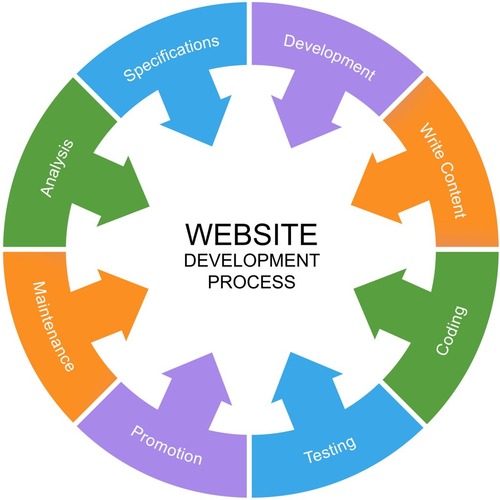
Furthermore, incorporating User Experience (UX) best practices, such as intuitive navigation and clear calls-to-action (CTAs), severely enhances user satisfaction and conversion rates.
Finally, adopting a culture of Continuous Testing and post-launch maintenance, including security audits and performance monitoring, is decisive for long-term improvement and stability.
Enhancing Website Performance
Enhancing Website Performance chiefly focuses on optimizing speed and responsiveness to meet user expectations and progress search engine rankings. Key strategies include image optimization (compression and serving next-gen formats like WebP), code minification to reduce file sizes of HTML, CSS, and JavaScript, and leveraging browser caching to speed up repeat visits.
Furthermore, utilizing a Content Delivery Network (CDN) distributes content worldwide for faster delivery, while optimizing the server response time (Time to First Byte or TTFB) is decisive, often achieved through better hosting and efficient database queries.
The final goal is to achieve excellent Core Web Vitals scores, ensuring a delightful and efficient experience for every user. A fast website improves user satisfaction and SEO.
Image Optimization
Use tools like TinyPNG or WebP formats to reduce large image sizes.
Caching and CDN Usage
A Content Delivery Network (CDN) distributes your website worldwide and reduces load time.
Strengthening SEO
Search engine optimization is an ongoing task.
Fixing Technical Issues
Resolve issues like broken links, duplicate content, and missing metadata.
Creating Search-Intent-Friendly Content
Creating Search-Intent-Friendly Content includes crafting web material that directly and efficiently answers the precise reason a user made a search query. This requires identifying the four main types of intent, Informational (seeking knowledge), Navigational (seeking a specific site), Transactional (seeking to buy), and Commercial Investigation (seeking product reviews) and tailoring the format, depth, and tone accordingly.
For example, informational intent requires wide-ranging guides, while transactional intent needs clear product pages and CTAs. By aligning content with user intent, websites meaningfully improve their relevance, resulting in higher rankings, lower bounce rates, and increased conversions. Write content that directly matches what users are searching for.
Improving UX Design
A smooth user experience reduces bounce rates.
Simplifying Navigation
Keep your menu clutter-free and intuitive.
Mobile-First Design
Website Design for mobile before desktop for better responsiveness.
Boosting Website Security
Boosting Website Security comprises implementing a multi-layered defence strategy to protect data, users, and the site’s integrity from malicious attacks. Important measures include enforcing SSL/TLS encryption (HTTPS) to secure data transmission, frequently updating all software (CMS, themes, and plugins) to patch known vulnerabilities, and using strong, unique passwords with Multi-Factor Authentication (MFA).
Furthermore, implementing a Web Application Firewall (WAF) filters out suspicious traffic, and conducting recurrent security audits and backups safeguards that data can be rapidly restored in the event of a breach. Security should never be optional.
Regular Security Updates
Update CMS, plugins, and themes on time.
Using Strong Authentication
Enable:
- Two-factor authentication
- Secure passwords
- Firewall protection
Upgrading the Functionality of a Website
Upgrading the Functionality of a Website involves implementing new features and enhancing existing capabilities to advance performance, user engagement, and business operations.
This often includes integrating modern technologies, such as adding e-commerce features for online transactions, incorporating classy form validation or real-time chat support for better user interaction.
A key aspect is updating the causal code and database structure to support new features, ensuring the whole system is scalable and maintainable while maintaining fast loading speeds and robust security.
Testing Automation Tools
Use tools like Selenium to automate routine tests.
Web Accessibility Improvements
Make your site accessible to everyone by following WCAG guidelines:
- Alt text
- Clear headings
- Keyboard navigation
In Conclusion :
Evaluating website development isn’t a one-time task, it’s a constant process. By habitually analyzing performance, SEO, UX, security, and content quality, you safeguard that your website stays competitive and user-friendly.
Implementing the right improvements can boost traffic, conversions, and brand credibility. A well-optimized website is one of the strongest digital assets you can build.
FAQs
-
How often should I evaluate my website?
At least once every 3–6 months, or after any major update.
-
What’s the biggest factor affecting website performance?
Large media files and unoptimized code are the top culprits.
-
Which tool is best for SEO audits?
Ahrefs, SEMrush, and Google Search Console are the most commonly used tools.
-
Why is mobile responsiveness so important?
Most users browse on smartphones, and Google gives ranking priority to mobile-friendly sites.
-
How can I improve website security easily?
Start with SSL installation, regular updates, and malware scanning.