
In 2026, a staggering 63% of websites fail to effectively guide visitors towards desired actions, leading to lost opportunities and diminished returns. Your website is more than just an online brochure; it’s a dynamic tool designed to convert visitors into leads, customers, or subscribers.
The secret weapon in achieving this conversion lies in the strategic placement and compelling design of Calls to Action (CTAs). A well-crafted CTA isn’t just a button; it’s a clear, concise directive that tells your audience exactly what to do next, making the journey from browsing to action seamless. Without them, even the most informative content can leave visitors feeling lost and uninspired.
This comprehensive guide explores proven strategies for implementing effective CTAs across your website. We will delve into understanding your audience, crafting irresistible copy, designing visually appealing buttons, and strategically placing them for maximum impact. By mastering these elements, you can transform passive website visitors into engaged participants who actively contribute to your business goals.
What is a Call to Action (CTA)?
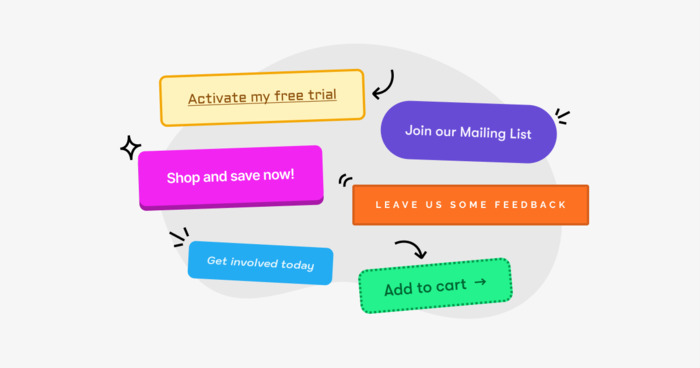
A Call to Action (CTA) is a prompt on a website, advertisement, or other marketing material that prompts an audience to take a specific, immediate action. Essentially, it’s the phrase or element designed to elicit an immediate response from the user.
CTAs are critical for guiding users through the sales funnel, from initial awareness to final conversion. They can take many forms, including text links, buttons, or images, and are typically designed to be prominent and easy to understand.
Why are CTAs Crucial for Website Success?
CTAs are the linchpin of website conversion. They act as signposts, directing users toward valuable actions that align with your business objectives. Without clear CTAs, visitors may explore your site but ultimately leave without taking any meaningful steps, such as making a purchase, signing up for a newsletter, or requesting a quote.
This directly impacts your return on investment (ROI) and overall business growth. Effective CTAs increase conversion rates, generate leads, drive sales, and improve user engagement.
Understanding Your Audience: The Foundation of Effective CTAs
Before you can craft a compelling CTA, you must deeply understand who you are trying to reach. This involves segmenting your audience and tailoring your CTAs to their specific needs, motivations, and stage in the buyer’s journey.
Developing Buyer Personas
Buyer personas are semi-fictional representations of your ideal customers. They are created based on market research and real data about your existing customers. Developing detailed buyer personas helps you understand your audience’s demographics, psychographics, pain points, goals, and online behaviour.
This understanding allows you to create CTAs that resonate with their specific needs and motivations. For instance, a CTA aimed at a first-time visitor might focus on offering a free guide, while a CTA for a returning customer might suggest a limited-time discount.
Mapping CTAs to the Buyer’s Journey
The buyer’s journey typically consists of three stages: Awareness, Consideration, and Decision. Your CTAs should evolve to match the user’s intent at each stage.
- Awareness Stage: At this initial stage, potential customers are experiencing a problem or need but may not be fully aware of the solutions available. CTAs here should focus on education and engagement.
Examples:* “Download Our Free Ebook,” “Read Our Latest Blog Post,” “Watch Our Explainer Video.”
- Consideration Stage: Users are now researching solutions to their problem. CTAs should encourage deeper engagement and comparison.
Examples:* “Compare Our Services,” “Sign Up for a Free Trial,” “Request a Demo,” “Download a Case Study.”
- Decision Stage: Customers are ready to make a purchase or commit to a solution. CTAs should be direct and emphasize value or urgency.
Examples:* “Buy Now,” “Get a Free Quote,” “Contact Us Today,” “Start Your Subscription.”
Crafting Compelling CTA Copy

The words you use in your CTA are paramount. They need to be clear, concise, action-oriented, and persuasive.
Using Action Verbs
Start your CTAs with strong action verbs that clearly tell the user what to do. Verbs create a sense of immediacy and purpose.
- Examples: Get, Download, Subscribe, Shop, Learn, Discover, Join, Start, Book, Contact.
Creating Urgency and Scarcity
Urgency and scarcity can significantly boost conversion rates by motivating users to act quickly.
- Examples: “Limited Time Offer: Shop Now!”, “Only 3 Spots Left: Register Today!”, “Sale Ends Tonight: Get Your Discount!”
Highlighting Value Proposition
Clearly communicate the benefit the user will receive by taking action. What problem does your CTA solve for them?
- Examples: “Get Your Free Marketing Plan,” “Unlock Exclusive Content,” “Save 20% on Your First Order.”
Keeping it Concise
CTAs should be brief and to the point. Users should understand what to expect without having to read a lengthy explanation. Aim for 2-5 words if possible.
Personalization
Where possible, personalize your CTAs based on user data or behavior. This can make the CTA feel more relevant and increase its effectiveness.
- Example: If a user has previously browsed specific products, a CTA could read, “Continue Shopping for [Product Category].”
Designing Effective CTA Buttons
The visual design of your CTA button plays a critical role in its visibility and click-through rate (CTR).
Colour Psychology and Contrast
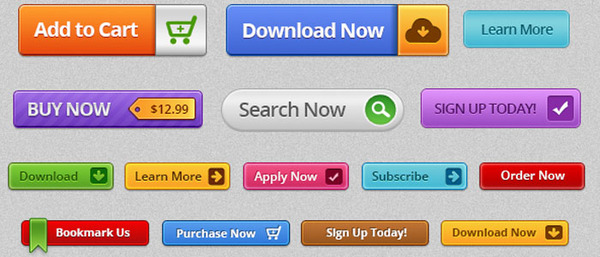
Use colours that stand out from the rest of your website design. High contrast is key. Red, orange, and green are often effective, but the best colour depends on your brand’s overall aesthetic and audience. A study by UXPin highlighted that contrasting colours for CTA buttons can increase conversions. The goal is to make the button immediately noticeable.
Button Size and Shape
Ensure your CTA buttons are large enough to be easily clicked, especially on mobile devices. Rounded corners are often perceived as more friendly and approachable than sharp, square corners. However, the optimal shape can vary based on brand identity.
Clear and Readable Font
Use a clear, legible font for your CTA text. Avoid overly decorative or small fonts that can be difficult to read at a glance. The text should be easily scannable.
White Space
Surround your CTA button with ample white space. This isolates the button, drawing the user’s eye to it and preventing it from getting lost among other elements on the page.
Website CTA Strategies to Boost Conversions
In the digital world, your Call to Action (CTA) is the bridge between a casual browser and a loyal customer. It’s not just a button; it’s a conversation starter. If your CTAs feel like an afterthought, you’re leaving money and connections on the table.
Here is how to transform your buttons from “meh” to “must-click” using strategies that prioritize human psychology over robotic scripts.
Speak Like a Human, Not a Bot
People don’t want to “Submit” or “Process.” They want to achieve a goal. Replace generic commands with benefit-driven language.
- The Boring Way: “Register Now”
- The Human Way: “Start My Free Trial” or “Send Me the Guide”
- Why it works: It shifts the focus from what the user has to do to what the user is going to get.
Master the “Golden Rule” of Placement
Don’t make your visitors hunt for the next step. A high-converting strategy uses a mix of:
- Above the Fold: For the “I’m ready now” crowd.
- The End of the Story: For those who need to read your full pitch before committing.
- The “Breadcrumb” CTA: Small, low-pressure links scattered through a blog post to capture interest as it happens.
Use Colour to Create “Visual Friction”
Your CTA should pop, not blend. Use a colour that contrasts with the rest of your site’s palette. If your site is mostly blues and whites, an orange or lime green button creates a visual “stop sign” that draws the eye naturally.
Create “Low-Stakes” Urgency
Fear of missing out (FOMO) is real, but don’t fake it with “Limited time only!” if it isn’t true. Instead, use transparent urgency:
“Join 5,000+ others getting weekly tips” or “Grab the last 10 spots for the April workshop.”
The “No-Brainer” Micro-Copy
Sometimes, a user is hovering over the button but feeling a bit of “click-anxiety.” Add a tiny line of text (micro-copy) right below the CTA to ease their mind.
- “No credit card required.”
- “Unsubscribe anytime.”
- “Takes less than 2 minutes.”
Comparison: What Makes a CTA Click?
| Feature | Low Conversion | High Conversion |
| Verb Style | Passive (e.g., “Learn More”) | Action-Oriented (e.g., “See the Results”) |
| Button Shape | Sharp edges (feels clinical) | Rounded edges (feels friendly/touchable) |
| Value Prop | Hidden or Vague | Clear and Immediate |
| Pressure | High-pressure/Aggressive | Helpful/Guidance-based |
The best CTA strategy is to treat your visitor like a friend who’s asking, “What do I do next?” Answer them clearly, kindly, and with a clear path to value. When you stop trying to “trap” a lead and start trying to help a human, your conversion rates will follow.
Strategic Placement of CTAs on Website for Better Conversions
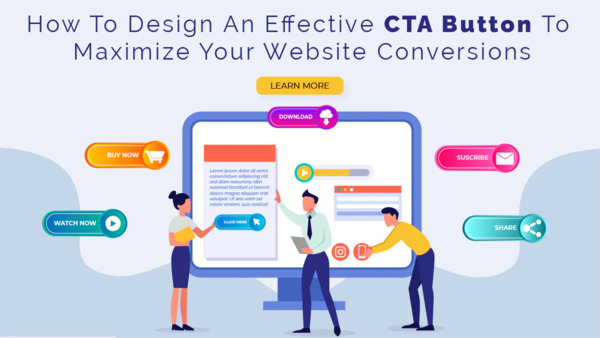
Where you place your CTAs on a webpage can dramatically influence their effectiveness. Strategic placement ensures that users see them at the right moment, when they are most receptive to taking action.
Above the Fold
Placing a primary CTA “above the fold” (the portion of the webpage visible without scrolling) can capture immediate attention from users who may not scroll down. This is often suitable for high-priority actions.
Within Content
Integrating CTAs naturally within your blog posts or articles can be highly effective. When a user is engaged with your content, a relevant CTA can seamlessly guide them to the next step. For example, after discussing a problem, a CTA to download a solution guide is appropriate.
End of Content
The end of a blog post or article is a natural place for a CTA. By this point, the user has consumed your information and may be ready to take the next step.
Footer CTAs
While less prominent, CTAs in the footer can capture users who have scrolled through the entire page and are still looking for direction. These are often used for secondary actions like newsletter sign-ups.
Pop-up CTAs
Pop-up CTAs, when used judiciously, can be effective for capturing attention and generating leads. However, they can also be disruptive if overused or poorly timed. Exit-intent pop-ups, which appear when a user is about to leave the site, are a less intrusive option.
Sidebar CTAs
Sidebars offer a persistent location for CTAs, ensuring they are visible as the user navigates the page. This is a good place for secondary or ongoing CTAs, such as newsletter subscriptions or links to popular resources.
Types of CTAs and Their Applications
Different goals require different types of CTAs. Understanding these variations allows you to choose the most appropriate prompt for your specific objective.
Lead Generation CTAs
These CTAs aim to capture contact information from potential customers.
- Examples:
“Download Your Free Guide” “Sign Up for Our Newsletter” “Register for Our Webinar” “Get a Free Consultation”
Sales CTAs
These CTAs are designed to drive direct purchases or sales conversions.
- Examples:
“Shop Now” “Add to Cart” “Buy Now” “Get a Quote”
Engagement CTAs
These CTAs encourage users to interact further with your content or brand.
- Examples:
“Learn More” “Read the Full Story” “Watch the Video” “Leave a Comment”
Navigation CTAs
These CTAs guide users to specific pages or sections of your website.
- Examples:
“Explore Our Services” “View Our Portfolio” * “Go to Pricing”
Optimizing CTAs for Mobile Devices
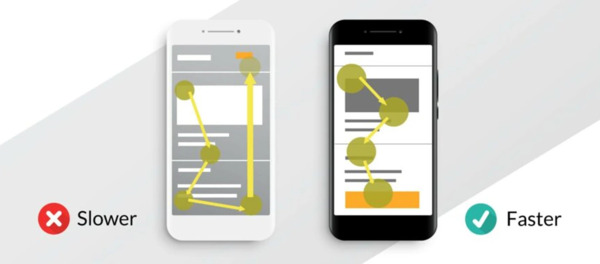
With the majority of web traffic now coming from mobile devices, optimizing your CTAs for smaller screens is non-negotiable.
Mobile-Friendly Design
Ensure your CTA buttons are large enough to be easily tapped with a thumb. Test their usability on various mobile devices. The recommended minimum tap target size is 44×44 pixels according to Apple’s Human Interface Guidelines.
Clear and Concise Text
Mobile screens have limited real estate. Keep CTA text brief and impactful. Avoid lengthy sentences or jargon.
Strategic Placement on Mobile
Consider how your CTAs appear on mobile. A pop-up that covers the entire screen on mobile can be frustrating. Prioritize CTAs that are essential for the user’s journey on smaller devices.
A/B Testing Your CTAs
Continuous improvement is key to maximizing CTA effectiveness. A/B testing allows you to compare different versions of your CTAs to see which performs best.
What is A/B Testing?
A/B testing, also known as split testing, involves creating two versions of a webpage element (e.g., a CTA button) , Version A (control) and Version B (variation) and showing each version to a different segment of your audience. You then measure which version achieves a higher conversion rate.
Key Elements to Test
- Copy: Test different verbs, value propositions, and urgency triggers.
- Colour: Experiment with different button colours.
- Size: Compare slightly larger or smaller buttons.
- Placement: Test the same CTA in different locations on the page.
- Shape: Compare rounded versus square buttons.
Analyzing Results
Use analytics tools to track CTRs and conversion rates for each version. A statistically significant difference indicates which version is more effective. Make data-driven decisions to refine your CTAs over time.
Advanced CTA Strategies
Beyond the basics, several advanced techniques can further enhance your CTA performance.
Using Video CTAs
Video can be a powerful medium for CTAs. Embed videos that explain a product or service, and include a clear CTA at the end or within the video itself. This can significantly boost engagement and understanding.
Gamification
Incorporate game-like elements into your CTAs to make them more engaging. This could involve challenges, rewards, or progress indicators that encourage users to complete a series of actions.
Social Proof
Leverage social proof in your CTAs to build trust and encourage action.
- Examples: “Join 10,000+ Satisfied Customers,” “See Why 95% of Users Recommend Us.”
Interactive CTAs
Create interactive elements that require user input, such as quizzes or calculators, with a CTA to see results or get a personalized recommendation.
Measuring CTA Performance
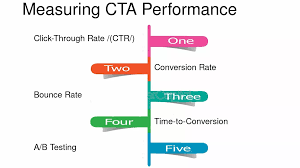
Tracking the right metrics is essential for understanding how well your CTAs are performing and identifying areas for improvement.
Key Performance Indicators (KPIs)
- Click-Through Rate (CTR): The percentage of users who click on your CTA after seeing it.
Formula: (Number of Clicks / Number of Impressions) 100
- Conversion Rate: The percentage of users who complete the desired action after clicking the CTA.
Formula: (Number of Conversions / Number of Clicks or Impressions) 100
- Bounce Rate: While not directly a CTA metric, a high bounce rate on pages with CTAs might indicate issues with relevance or design.
- Time on Page: Users spending more time on a page before clicking a CTA could indicate they are reading content, which is positive, but excessive time might suggest confusion.
Using Analytics Tools
Tools like Google Analytics are invaluable for tracking CTA performance. You can set up goal tracking to measure conversions originating from specific CTAs. Heatmaps and session recording tools can also provide visual insights into user interaction with your CTAs.
Common CTA Implementation Mistakes to Avoid
Even with the best intentions, several common pitfalls can undermine CTA effectiveness.
Even the best CTA strategy can fall flat if the technical execution gets in the way of the user experience. To keep your conversion path clear, avoid these common pitfalls:
- The “Wall of Choice” Paralysis: Bombarding a single page with five different competing offers confuses the visitor; stick to one primary goal per page to keep the journey focused.
- Vague or Robotic Labelling: Using “Click Here” or “Submit” tells the user nothing about the value they’re receiving, making the interaction feel transactional rather than rewarding.
- Mobile “Fat Finger” Friction: Many designers forget to test for thumb-space, resulting in buttons that are too small to tap or placed too close to other links on a smartphone.
- Blending into the Background: If your CTA matches your brand colours too perfectly, it becomes “invisible” to the eye; it needs enough contrast to stand out as a clickable element.
- The “Broken Promise” Redirect: Nothing kills trust faster than a button that leads to a broken 404 page or a landing page that doesn’t match the offer promised in the CTA.
Vague or Generic Copy
Using phrases like “Click Here” or “Submit” lacks specificity and fails to convey value. Always tell users what they will get or what will happen.
Poor Design and Visibility
CTAs that blend into the background, are too small, or are hidden are easily missed. Ensure your CTAs are visually distinct and easy to find.
Too Many CTAs
Overwhelming users with too many competing CTAs on a single page can lead to decision paralysis and reduced overall conversion. Prioritize the most important action.
Lack of Trust
If your website or offer lacks credibility, users will be hesitant to click. Ensure your site is professional, secure, and provides clear information.
Not Testing
Failing to A/B test your CTAs means you are likely missing out on significant optimization opportunities. Assume nothing; test everything.
Case Study: Enhancing Lead Generation with Strategic CTAs
Consider an e-commerce business selling artisanal coffee. Initially, their website featured a generic “Shop Now” button on the homepage and product pages. Their lead generation efforts were minimal, relying solely on product sales.
Problem: Low newsletter sign-ups and limited customer engagement beyond immediate purchases.
Strategy:
- Persona Development: Identified two key personas: “The Coffee Connoisseur” (seeking unique blends and brewing tips) and “The Busy Professional” (looking for convenient, high-quality coffee delivered regularly).
- Content Creation: Developed a downloadable guide: “The Ultimate Guide to Brewing the Perfect Cup at Home.”
- CTA Implementation:
Homepage: Replaced a generic banner with a compelling image and the CTA: “Download Your Free Brewing Guide.” This targeted “The Coffee Connoisseur.” Blog Posts: Integrated CTAs within relevant articles (e.g., a post on French press techniques included a CTA: “Master Your French Press: Get the Guide“).
Product Pages: Added a secondary CTA: “Join Our Coffee Club for Exclusive Discounts,” targeting repeat customers and “The Busy Professional” looking for subscriptions. Exit-Intent Pop-up: Offered a 10% discount on the first order with the CTA: “Get 10% Off Your First Order!“
Results:
- Newsletter sign-ups increased by 150% within three months.
- Average order value for new customers who downloaded the guide increased by 18%.
- Repeat purchase rate saw a 25% uplift due to the new “Coffee Club” CTA.
This case study demonstrates how understanding audience segments and tailoring CTAs to specific journey stages and content can significantly improve lead generation and customer loyalty.
The Future of CTAs: AI and Personalization
The landscape of digital marketing is constantly evolving, and CTAs are no exception. Artificial intelligence (AI) and hyper-personalization are poised to revolutionize how we implement and optimize calls to action.
AI-Powered CTA Optimization
AI algorithms can analyze vast amounts of user data in real-time to dynamically adjust CTAs. This means showing the most relevant CTA to each individual visitor based on their browsing history, demographics, location, and even the time of day.
AI can also automate A/B testing at scale, identifying optimal CTA variations much faster than manual methods. Imagine a website that changes its primary CTA from “Request a Demo” to “Download Case Study” based on whether the visitor has previously engaged with detailed product information.
Hyper-Personalization
Moving beyond basic personalization, hyper-personalization tailors every aspect of the user experience, including CTAs, to the individual. This could involve using the user’s name, referencing their past interactions, or offering solutions specifically aligned with their known pain points.
For instance, a returning customer who abandoned their cart might see a CTA like, “Complete Your Order for the [Product Name] You Loved,” possibly with a small incentive.
Voice and Conversational CTAs
With the rise of voice search and conversational interfaces, CTAs are becoming more conversational. Instead of just buttons, we might see prompts like, “Ask me about our services,” or prompts within chatbots that guide users through complex decisions naturally.
Conclusion
Implementing effective Calls to Action is not a one-time task but an ongoing process of understanding, crafting, designing, placing, and testing. By focusing on your audience, aligning CTAs with their journey, using compelling language, and designing visually appealing prompts, you can significantly enhance user engagement and drive conversions.
Remember that continuous A/B testing and embracing emerging technologies like AI and personalization will ensure your CTAs remain powerful tools for achieving your website’s goals in the dynamic digital landscape of 2026 and beyond.
Frequently Asked Questions
What is the most important factor in CTA success?
The most critical factor in CTA success is clarity. Users must immediately understand what action they are expected to take and what benefit they will receive by taking it. Clear, concise language combined with a visually distinct design ensures the CTA is both seen and understood.
How many CTAs should be on a single webpage?
There is no single magic number, but it’s crucial to avoid overwhelming the user. Prioritize the primary goal for each page and feature one dominant CTA. Secondary CTAs can be included, but they should be less prominent and strategically placed to avoid diluting the main message or causing confusion. A common best practice is one main CTA above the fold and potentially 1-2 supporting CTAs further down.
Should CTA buttons be text or image-based?
CTA buttons are most effective when they are visually distinct elements, typically using a button format with clear text. While text links can serve as CTAs, dedicated buttons generally perform better due to their higher visibility and explicit design, signaling an actionable element. Images can support a CTA but should not replace the clear button design itself.
How can I measure the effectiveness of my CTAs?
You can measure CTA effectiveness using key performance indicators (KPIs) tracked via website analytics tools. The most important metrics include Click-Through Rate (CTR), which shows how many people click the CTA relative to how many see it, and Conversion Rate, which measures how many users complete the desired action after clicking. Setting up goal tracking in tools like Google Analytics is essential.
Is it better to use “Submit” or a more descriptive CTA?
It is almost always better to use a descriptive CTA instead of generic terms like “Submit” or “Click Here.” Descriptive CTAs communicate the value proposition or the outcome of the action. For example, “Download Your Free Ebook,” “Get Your Free Quote,” or “Sign Up for Weekly Tips” are far more effective because they tell the user exactly what they will receive.
How often should I update my CTAs?
You should regularly update your CTAs based on performance data and evolving marketing strategies. Implement a process of continuous A/B testing to identify underperforming CTAs and optimize them. Additionally, refresh CTAs seasonally, for specific campaigns, or when introducing new products or services to maintain relevance and effectiveness.